
A website redesign should not begin with “make it look newer.” A successful redesign starts by identifying what the current website is failing to do for users and for the business.
An outdated visual style may be part of the problem, but redesign projects often involve deeper issues: confusing navigation, slow pages, weak mobile usability, poor conversion paths, outdated content, inaccessible interfaces, difficult content management, or an SEO structure that has grown messy over time.
Professional website redesign services should improve the entire experience without throwing away the search visibility, content equity, analytics history, and brand recognition the business has already built.
At Axtronica Digital Studio, we recommend treating a redesign as a controlled business and technical project, not simply a new coat of visual paint.
Table of Contents
What Are Website Redesign Services?
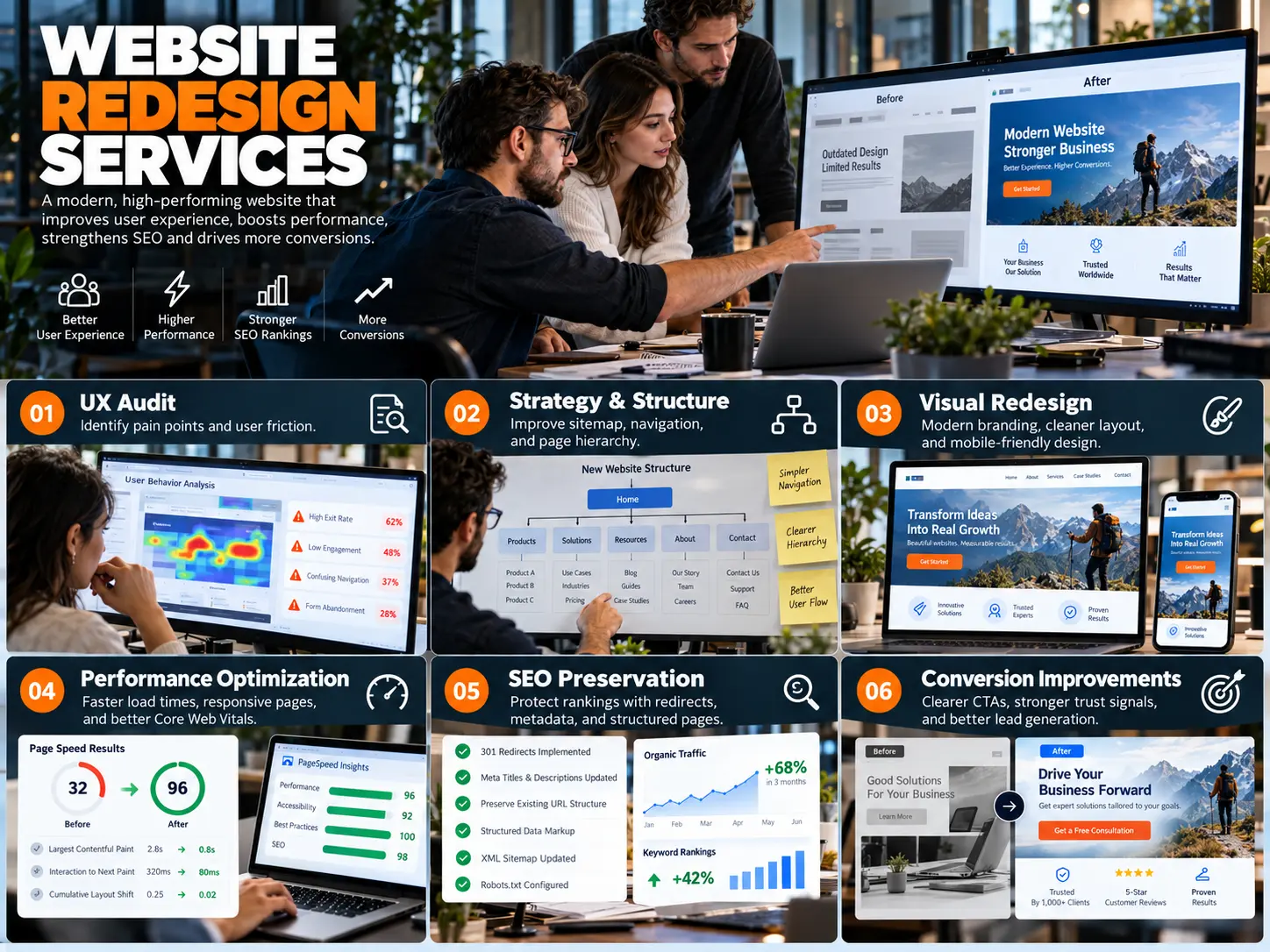
Website redesign services evaluate and rebuild an existing website to improve design, user experience, performance, functionality, search visibility, accessibility, and conversion.
Depending on the project, a redesign can include:
- UX research
- Information architecture
- UI design
- Responsive design
- Content strategy
- SEO migration planning
- Conversion optimization
- Performance improvements
- CMS changes
- Ecommerce improvements
- Accessibility improvements
- Analytics setup
- Development
- Quality assurance
- Redirect mapping
- Launch support
A redesign may keep the same platform or move to a new one.
Signs Your Website Needs a Redesign
A redesign may be worth considering when:
- The site looks noticeably outdated.
- Mobile usability is poor.
- Pages load slowly.
- Visitors struggle to find key information.
- The website generates traffic but few leads or sales.
- Content is difficult to update.
- The brand has changed significantly.
- Services or products no longer match the site structure.
- The site has technical debt from years of plugins and patches.
- SEO performance is limited by architecture or template problems.
- Accessibility issues are widespread.
- A business has outgrown the current CMS or ecommerce platform.
A redesign is a major project. If only one or two problems exist, targeted improvements may be more efficient.
Start With Goals, Not Inspiration Screenshots
Before choosing colors or layouts, define what the redesign needs to improve.
Possible goals include:
- Increase qualified leads
- Improve ecommerce conversion
- Make mobile navigation easier
- Clarify services
- Reduce bounce from important landing pages
- Improve page speed
- Strengthen brand perception
- Support international markets
- Make content easier to manage
- Protect or grow organic traffic
Clear goals make design decisions easier because the team can evaluate whether a change supports the outcome.
Audit the Existing Website Before Rebuilding It
A redesign should begin with evidence.
Review:
- Top landing pages
- Organic traffic
- Search rankings
- Conversion paths
- High-performing content
- Navigation patterns
- Device usage
- Page speed
- Form completion
- Ecommerce behavior
- Broken links
- Existing backlinks
- User feedback
One of the biggest redesign mistakes is removing pages because they look old without checking whether they generate traffic, links, or conversions.
Redesign the Information Architecture
Information architecture is the way pages are organized, labeled, and connected.
A growing business often accumulates duplicated services, outdated pages, confusing menus, and content buried several clicks deep.
A redesign is an opportunity to simplify.
Strong architecture should help users answer:
- Where am I?
- What does this company offer?
- Where can I find details?
- What should I do next?
It should also create clear relationships between services, industries, locations, resources, and conversion pages.
Protect SEO During a Website Redesign
SEO protection is one of the most important parts of a redesign.
Before launch, inventory the current URLs and identify which pages will be:
- Kept
- Updated
- Merged
- Redirected
- Removed
Create one-to-one 301 redirects wherever a relevant replacement exists. Do not redirect every deleted page to the homepage.
Also preserve or improve:
- Title tags
- Page headings
- Important copy
- Internal links
- Canonical tags
- Structured data
- Image alt text
- XML sitemaps
- Robots directives
If URLs do not need to change, keeping them stable can reduce migration risk.
Improve UX and Conversion Paths
A redesign should make important tasks easier.
For service businesses, that might mean:
- Clear service navigation
- Strong calls to action
- Simple forms
- Click-to-call on mobile
- Trust signals near conversion points
- Better project or case study presentation
For ecommerce, it might mean:
- Better product discovery
- Useful filters
- Clear product information
- Faster pages
- Stronger search
- Reduced checkout friction
Do not optimize for aesthetics at the expense of usability.
Design Mobile First, Not Mobile Last
Responsive design is now a basic expectation, but many websites still treat mobile as a compressed desktop layout.
Mobile design should consider:
- Thumb-friendly controls
- Readable type
- Shorter navigation paths
- Tap-to-call actions
- Fast-loading media
- Sticky actions where useful
- Simple forms
- Clear product information
- Reduced visual clutter
Test on real devices and multiple screen sizes rather than relying entirely on a design preview.
Make Performance Part of the Design System
Page speed should not be postponed until after design approval.
Design choices influence performance through:
- Image sizes
- Video backgrounds
- Animation
- Font files
- Third-party scripts
- Large sliders
- Complex libraries
- App and plugin dependencies
A modern website can still feel premium without being heavy. Performance should be discussed during design and development, not only during the final QA week.
Improve Accessibility During the Redesign
A redesign is an ideal time to fix accessibility problems that are difficult to patch into an old interface.
Review:
- Color contrast
- Keyboard navigation
- Focus states
- Heading structure
- Form labels
- Error messages
- Alternative text
- Link purpose
- Touch target size
- Motion
- Screen-reader semantics
Applicable accessibility requirements vary by region and organization, so businesses should understand the standards and legal obligations relevant to them.
Refresh Content Without Losing Search Value
Redesign projects often expose weak or outdated content.
Update copy so it is:
- Clear
- Accurate
- Specific
- Useful
- Easy to scan
- Aligned with search intent
- Consistent with the brand voice
Do not reduce useful, ranking content to a few marketing slogans simply because the new layout has less space. Design should support content, not force valuable information out.
Use Real Proof Throughout the Site
Trust signals should appear where decisions happen.
Examples include:
- Client reviews
- Case studies
- Project images
- Results with context
- Certifications
- Team experience
- Awards
- Security information
- Guarantees where genuinely offered
A redesign creates an opportunity to place proof more strategically instead of collecting it on one testimonials page.
Choose the Right CMS and Technology
A redesign may reveal that the current platform is still appropriate, or it may show that the business has outgrown it.
Evaluate:
- Ease of editing
- Security
- Performance
- SEO control
- Ecommerce requirements
- Integrations
- Scalability
- Developer availability
- Ownership
- Ongoing maintenance
The most fashionable technology is not automatically the best choice. The system should fit the team that will operate it after launch.
Build a Staging and QA Process
Never redesign a live website directly without a controlled process.
A proper staging workflow allows teams to test:
- Navigation
- Forms
- Mobile layouts
- Browser compatibility
- Analytics
- Tracking pixels
- Schema
- Redirects
- Page speed
- Ecommerce transactions
- Account functions
- Search
- Accessibility
- Broken links
Create a pre-launch checklist and assign ownership for each validation task.
Website Redesign Process
1. Discovery and Audit
Define goals, audience, technical constraints, analytics, SEO performance, and current problems.
2. Sitemap and Architecture
Organize content and navigation around user needs and business priorities.
3. Wireframes
Plan hierarchy and functionality before visual styling distracts from usability.
4. Visual Design
Apply typography, color, imagery, components, and brand direction.
5. Development
Build responsive templates, CMS functionality, integrations, and interactions.
6. Content Migration
Move, rewrite, consolidate, and optimize content carefully.
7. SEO Migration
Map redirects, metadata, canonicals, schema, sitemaps, and indexation controls.
8. Quality Assurance
Test devices, browsers, forms, tracking, accessibility, performance, and functionality.
9. Launch and Monitoring
Monitor errors, indexation, analytics, rankings, conversions, and user behavior after launch.
What Does a Website Redesign Cost?
Redesign pricing depends heavily on scope.
Cost factors include:
- Number of templates and pages
- Custom design level
- Content writing
- Ecommerce features
- Integrations
- CMS complexity
- Migration requirements
- Custom development
- Accessibility work
- SEO migration
- Data migration
- Testing
A small service website and a large ecommerce platform should not be compared by a simple per-page price.
Common Website Redesign Mistakes
Changing Every URL
URL changes add risk. Change them only when there is a clear structural reason.
Designing Before Understanding Content
Layouts built with placeholder copy often break when real content arrives.
Removing High-Performing Pages
Audit traffic, links, rankings, and conversions before deleting content.
Launching Without Redirect Testing
Broken redirects can damage user experience and organic visibility immediately.
Ignoring Analytics
If tracking is not validated, the team may lose the ability to measure whether the redesign improved anything.
Treating Launch as the Finish Line
A redesign should be monitored after launch. Real users will reveal opportunities that testing missed.
How to Choose Website Redesign Services
Ask potential partners:
- How do you protect existing SEO?
- Will you audit analytics before designing?
- Who handles content migration?
- How are redirects planned and tested?
- What is the mobile design process?
- How do you approach page speed?
- What accessibility practices are included?
- Who owns the website and source files?
- What happens after launch?
Our web design services combine responsive design, development, SEO-aware structure, and business-focused user experience for companies that need more than a visual refresh.
FAQs
Q1. What are website redesign services?
They are professional services that improve an existing website’s design, usability, structure, performance, functionality, content, SEO, and conversion experience.
Q2. How often should a website be redesigned?
There is no fixed schedule. Redesign when the website no longer supports the business, users, brand, technology, or search performance. Continuous smaller improvements can sometimes delay the need for a full rebuild.
Q3. Will a website redesign hurt SEO?
It can if URLs, content, internal links, metadata, redirects, or technical settings are changed carelessly. A planned SEO migration can protect existing visibility and create opportunities to improve it.
Q4. Should I redesign or rebuild my website?
A redesign may keep the existing CMS and codebase while changing the user experience and visuals. A rebuild replaces more of the underlying system. The right choice depends on technical debt, performance, features, maintainability, and business goals.
Q5. How long does a website redesign take?
Timing depends on scope, number of templates, content, approvals, integrations, development complexity, and migration needs. A simple site can move faster than a custom ecommerce or enterprise platform.
Redesign Around Business Performance, Not Fashion
Website redesign services deliver the most value when design, content, SEO, performance, accessibility, and conversion are planned together.
A new visual style may create the first impression, but the greater improvements determine whether users can find information, trust the business, complete tasks, and convert.
Protect what already works, fix what holds the site back, and measure performance after launch. That turns a redesign from a cosmetic project into a long-term digital asset.